


Hosted (SaaS) Website Content Management System from InterBinary
Our SaaS Content Management System provides ease of management of websites, small or large.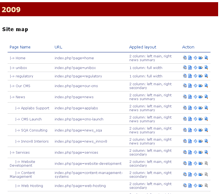
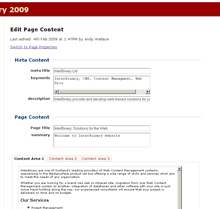
Overview of the InterBinary Hosted (SaaS) CMS
Here are some of the main features of our SaaS Website CMS:
- It is a hosted service, accessed from standard web browsers. No software to install and accessible from anywhere you have an Internet connection.
- Edits, when saved, are viewable immediately on the website
- Neat website structure view allowing you to easily find the page you need to edit
- Ability to publish/unpublish pages in your website
- Switchable themes and templates for your website. Refresh the look and feel of your website whilst maintaining the content.
- WYSIWYG content editing.
- User editable CSS, in addition to that provided in your website templates
- Configurable navigation menus
- Upload of binary content (images, PDF/Word documents etc) to link to from within pages
- Identify a page of content as a 'news' page, which can be summarised elsewhere on the website.
- Contact forms
- SEO friendly - simple URLs, editable metadata, automatic generation of XML sitemap.
Some Terminology Explained
SaaS - "Software-as-a-Service" - is an industry-wide term used to describe software which is rented as a service from a service provider, rather than being purchased or licensed for local installation.Website template is a term which means a pre-created "layout container" for website page content. These are vital components for enabling and ensuring brand/styling consistency, ease of maintenance and update and common user experiences across website pages. A typical CMS website will have many templates, allowing the editors to choose from a set of layouts to suit each individual website page.
